
- Neighbourhood
- >
- Internet
- >
- Modems & Hardware
- >
- Re: BYO Modem Settings - PPPoE username/password s...
Modems & Hardware
Questions and discussion about modems and other hardware used to get online with AGL
Options
- Subscribe to RSS Feed
- Mark Topic as New
- Mark Topic as Read
- Float this Topic for Current User
- Bookmark
- Subscribe
- Mute
- Printer Friendly Page
BYO Modem Settings - PPPoE username/password settings

- Mark as New
- Bookmark
- Subscribe
- Mute
- Subscribe to RSS Feed
- Permalink
- Report abuse
10
Replies
0
Likes
310302
Views
Hi Team,
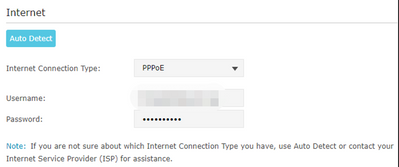
As a new customer, I am trying to connect the BYO modem to AGL NBN internet service. Can you please let me know how to fill in the Username and Password in my Modem? Thanks
Solved Go to Answer
- Tags:
- help_setupinternet
0
Likes
70 REPLIES 70

- Mark as New
- Bookmark
- Subscribe
- Mute
- Subscribe to RSS Feed
- Permalink
- Report abuse
0
Replies
0
Likes
28386
Views
my one is FTTP - so connected with the ethernet cable to red port on the modem to NBN box on UNI-D port 2
0
Likes

- Mark as New
- Bookmark
- Subscribe
- Mute
- Subscribe to RSS Feed
- Permalink
- Report abuse
0
Replies
0
Likes
28302
Views
For FTTP users, the other thing not mentioned anywhere is that if you have a current ISP connection and are switching to a new service you cannot use the same current physical UNI-D port on the NBN NTD box. i.e. If you have an internet connection with ISP A on UNI-D 1 port, the new ISP B will establish the new connection on UNI-D 2 port and you will have to swap over your Router's Ethernet cable to the UNI-D 2 port to use the new service.
I have also now had success with the username and password being your ACCxxxxxx number as others have already confirmed.
Little disappointed in the lack of instructions and information from AGL on this.
0
Likes

- Mark as New
- Bookmark
- Subscribe
- Mute
- Subscribe to RSS Feed
- Permalink
- Report abuse
0
Replies
0
Likes
28206
Views
True, I also got Bill after 2 days of connection. Also, facing disconnection almost everyday. Most of the time in the night time after 9.3pm.
0
Likes
- Mark as New
- Bookmark
- Subscribe
- Mute
- Subscribe to RSS Feed
- Permalink
- Report abuse
0
Replies
0
Likes
28206
Views
Same experience bro.
0
Likes

- Mark as New
- Bookmark
- Subscribe
- Mute
- Subscribe to RSS Feed
- Permalink
- Report abuse
0
Replies
0
Likes
28055
Views
I have same problems they working fast with the bill. I transfer my nbn from Optus to agl but they didn’t do transfer they just make connections and then send bill and I’m till using Optus .now after transfer I have is one more bill to pay for it
0
Likes

- Mark as New
- Bookmark
- Subscribe
- Mute
- Subscribe to RSS Feed
- Permalink
- Report abuse
0
Replies
0
Likes
28052
Views
I have been able to connect to the internet after a technician came to my appartment and reconnect the wire inside of the internet box in the basement. He said my internet wire was connecting to TPG and not nbn (might be the previous owner used TPG service)
In summary, to be able to connect to internet I need
Hardware:
- Ensure internet wire in the internet box (usually in the basement if you live in appartment) connect to nbn (need help of technician).
- Telephone wire from the wall to the DSL port on the modem (any modem is good, I have tested Telstra Smart Modem Gen 2 with voice backup, and TP Link Archer 1600V with good result on both)
Software:
- In the GUI, Set the username: accXXXXXX, password: accXXXXXX
0
Likes
- Mark as New
- Bookmark
- Subscribe
- Mute
- Subscribe to RSS Feed
- Permalink
- Report abuse
1
Reply
1
Like
27911
Views
I had the same issue when I had my own router which had been used in a different network. The solution described here surely works. However, if your device is a modem router, you first need to change the settings in the router app to make sure that you are using the router only option. Then use the account number as the username and password and then you are good to go. Took a half a day for me to find this out.

- Mark as New
- Bookmark
- Subscribe
- Mute
- Subscribe to RSS Feed
- Permalink
- Report abuse
0
Replies
0
Likes
27904
Views

- Mark as New
- Bookmark
- Subscribe
- Mute
- Subscribe to RSS Feed
- Permalink
- Report abuse
3
Replies
1
Like
27629
Views
- Mark as New
- Bookmark
- Subscribe
- Mute
- Subscribe to RSS Feed
- Permalink
- Report abuse
2
Replies
0
Likes
27617
Views
Hi,
Connected my modem to dsl and it worked.
Hope, you got correct credentials to feed in.
0
Likes
Get more from Help and Support
Set up a modem or router
Help to set up a modem or router you bring yourself once your nbn® connection is live.
Set up a popular BYO modem
View setup instructions and connect a D-Link, ASUS or Netgear modem device to your AGL nbn® plan.
Connect a home phone
Learn how to get an AGL Home Phone connected on the nbn® network.